
Data security is one of the things that users are most concerned about over the internet.
Why Should You Use the Cookies Consent Bar Widget ?
By using the Cookies Consent Bar on your Odoo website, you make sure that your website fulfills the requirements of various data protection laws across the world, such as GDPR in Europe and CCPA in the United States. This Odoo widget's presence demonstrates that your Odoo website respects user privacy and practices responsible data management.



Odoo website Cookie Consent allows you to ask permission from users to store their details. In addition, the module obeys GDPR law. Further, the cookie consent banner asks for user permission to collect information.
Building Trust with Users
By explicitly stating that your Odoo website uses cookies, you foster transparency with your site visitors, which in turn, builds trust. The more transparent you are about your data usage, the more likely visitors are to view your
Avoiding Potential Legal Issues
The widget assists in preventing potential legal complications or penalties by ensuring compliance with data protection and privacy laws. By providing a clear cookie consent notice on your Odoo website, you can mitigate the risk of potential expensive legal battles.
Cookies bar
Cookies are small text files sent to your device when you visit a website. They are processed and stored by your browser and contain information about your visit, such as login data, location, language, etc. There are two main types of cookies:
- Essential cookies, which are necessary for the website to function properly;
- Non-essential or optional cookies, which are used to analyze your behavior or display advertisements.

Notifying users about data collection, as well as its methods and purposes, is required by data protection laws such as GDPR. Cookies bars are commonly used to fulfill this obligation in a user-friendly and transparent manner. They are displayed immediately upon a user’s first visit to inform them that the website uses cookies and let them decide whether they want to store non-essential cookies on their device.
Configuration
To enable the cookies bar on your Odoo website, go to Website ‣ Configuration and enable Cookies Bar in the Privacy section.
Customisation
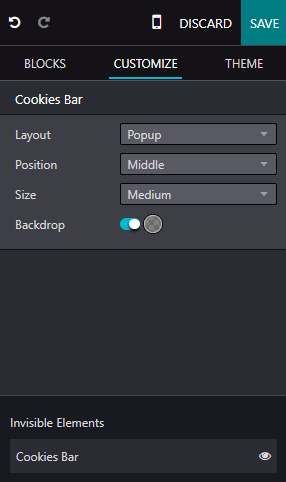
To adapt the display of the cookies bar, click Edit and select the Cookies Bar building block in the Invisible Elements at the bottom of the panel. Customise it using the options in the Customise tab in the edit panel.
Three Layouts are available:
- Discrete: thin bar
- Classic: banner
- Popup: you can change the popup’s Position to the Top, Middle, or Bottom of the screen.
You can also:
- modify the Size of the cookies bar;
- enable Backdrop to gray out the page in the background when the cookies bar is displayed on the screen;
- further customize the appearance of the cookies bar using Block and/or Column customisation options, which are available after clicking anywhere in the building block.
To edit the contents of the cookies bar (i.e., the consent message), click directly in the building block.
Cookie policy
When you enable the cookies bar for your website, Odoo creates the Cookie Policy page (/cookie-policy) with the list of essential and optional cookies. To access it, click the Cookie Policy hyperlink in the cookies bar or open the page from Website ‣ Site ‣ Pages.
Sources:
Odoo Official Page